

Using the fixer

Paste the garbled text and copy the result. Every broken sequence is repaired at once, and anything that was already right stays exactly as it was, so you can paste a whole document that's only partly broken. The working lists each repair, with the bytes behind it and a link to the page about that sequence.
Text that was garbled twice, so ’ became ’, is undone layer by layer. Three switches tidy up afterwards if you want them: remove a byte order mark, turn no-break spaces into ordinary ones, and straighten curly quotes. All three are off unless you turn them on.
What mojibake is
Mojibake is text decoded with the wrong character encoding. The word is Japanese, 文字化け, meaning character transformation, and Japanese text suffers from it often. In English text the usual cause is one mix-up: the text was saved as UTF-8, the encoding nearly everything uses now, and then read as Windows-1252, an older encoding that Windows and many programs still fall back to.
How ’ becomes ’
How ’ becomes ’stringmash.com/mojibake-fixer
Why one character becomes three
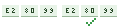
In UTF-8 the apostrophe ’ is three bytes, E2 80 99. Windows-1252 has one character for every byte, so it reads those three bytes as three characters: â, € and ™. Every character outside plain ASCII breaks the same way into two, three or four junk characters, and because UTF-8 is so regular, each character always breaks into the same junk. That's what makes it fixable: turn the junk back into bytes and read them as UTF-8.
Common garbled sequences
| You see | It should be | Code point | UTF-8 bytes |
|---|---|---|---|
| ’ | ’ apostrophe | U+2019 | E2 80 99 |
| “ | “ left double quote | U+201C | E2 80 9C |
| â€[U+009D] | ” right double quote | U+201D | E2 80 9D |
| — | — em dash | U+2014 | E2 80 94 |
| – | – en dash | U+2013 | E2 80 93 |
| … | … ellipsis | U+2026 | E2 80 A6 |
| é | é é | U+00E9 | C3 A9 |
| è | è è | U+00E8 | C3 A8 |
| á | á á | U+00E1 | C3 A1 |
| ñ | ñ ñ | U+00F1 | C3 B1 |
| ü | ü ü | U+00FC | C3 BC |
| Â[no-break space] | (no-break space) non-breaking space | U+00A0 | C2 A0 |
|  | (BOM) byte order mark | U+FEFF | EF BB BF |
Common garbled sequencesstringmash.com/mojibake-fixer
Where it comes from
Spreadsheets are the most common source. A CSV file saved as UTF-8 without a byte order mark often opens in Excel as Windows-1252: the Excel CSV guide shows how to open it correctly instead.
Databases are next. A table or connection set to Latin-1 while the application sends UTF-8 stores the bytes faithfully and hands them back mislabelled, and the damage often appears all at once after a migration to a new server.
Then email, where a message's declared character set and its real one can disagree, and copy and paste between programs that make different guesses about a file's encoding.
How to prevent it
Use UTF-8 everywhere and say so. Declare it in web pages with a meta charset tag and in the Content-Type header, set databases and their connections to UTF-8 (in MySQL that's utf8mb4, since its older utf8 can't store emoji), and open CSV files through Excel's import rather than by double-clicking. When a file arrives from elsewhere, check its encoding before you edit and save it, because saving garbled text makes the damage permanent in a new place.
Questions
What is ’ in my text?
A broken apostrophe, ’. The text was saved as UTF-8 and read as Windows-1252. Paste it above to fix it.
Will the fixer change text that's already correct?
No. A repair is only kept when the result is valid and clearly less garbled than before, so café, don’t and naïve pass through unchanged.
Can it fix every kind of garbled text?
It fixes UTF-8 read as Windows-1252 or Latin-1, which covers nearly all garbled English and Western European text. Other mix-ups, such as Japanese or Russian text read with the wrong legacy encoding, need a different repair.
Is my text sent anywhere?
No. The fixer runs in your browser.
Sources
- WHATWG Encoding Standard: index-windows-1252
- RFC 3629: UTF-8, a transformation format of ISO 10646
- Wikipedia: Mojibake
- MySQL 8.4 Reference Manual: The utf8mb3 character set
Added . What's new